
Key takeaways
What matters before you keep reading
01
Send the current tech pack with a short garment summary, request type, quantity, timeline, and specific questions for the factory.
02
Make pending assumptions explicit so the manufacturer does not treat draft details as approved production instructions.
03
A generated tech pack is strongest when the team reviews it before sharing the export with a factory.
Reader guide
Reader guide
A quick frame before the workflow details.
For
Founders, designers, product developers, and sourcing teams preparing factory outreach.
Read when
Best read after the tech pack draft is ready and before the first manufacturer email.
You'll get
A practical sending checklist, email structure, attachment guidance, and manufacturer question list.
On this page
Follow the article through the long read and keep your place.
On this page
5 sections
Sending a tech pack is not just attaching a PDF. The manufacturer needs enough context to understand what you want them to do with it.
Are you asking for a quote, a first sample, material feedback, minimum order quantity, or production capability check? Say that clearly.
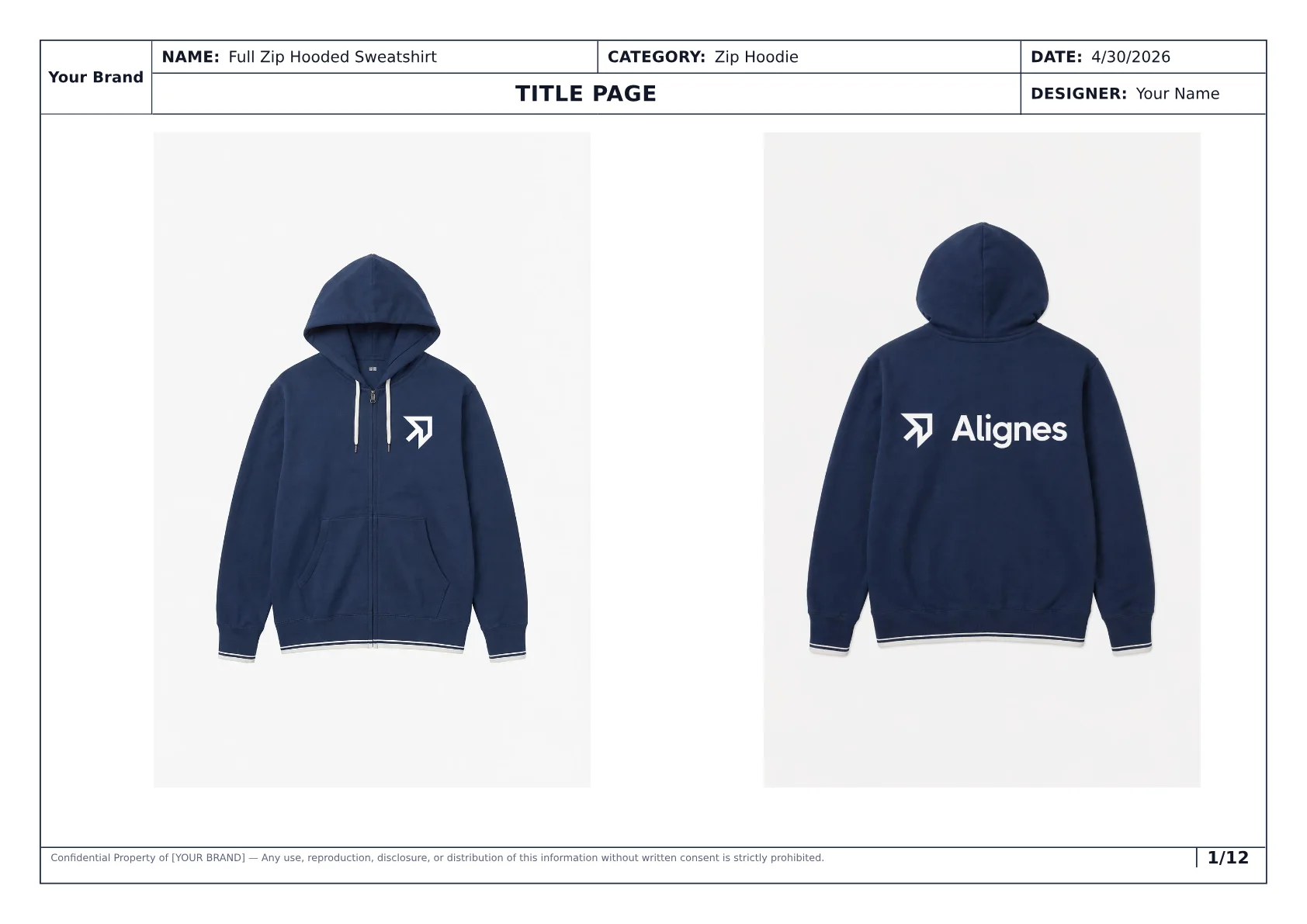
The first page helps a manufacturer quickly understand the garment, sample size, date, and current handoff context.
What to send
Send:
- current tech pack PDF or share link,
- short product summary,
- garment category,
- sample size and size range,
- target quantity,
- target timeline,
- request type,
- material or sourcing expectations,
- specific questions for the factory,
- contact details,
- next step you want from the factory.
Do not send a vague message like "How much would this cost?" with no garment context.
Email structure
Use a short, specific structure:
- Introduce the brand or team.
- Name the garment and category.
- State the request.
- Attach or link the tech pack.
- Mention quantity and timeline assumptions.
- Call out pending decisions.
- Ask the manufacturer to confirm fit, missing information, and next steps.
What to ask the manufacturer
Good questions:
- Can you make this garment category?
- What information is missing before quoting?
- Can you support sampling before production?
- What minimums apply?
- Which materials or trims need sourcing clarification?
- What sample timeline should we expect?
- Which parts of the tech pack need revision before you proceed?
- Can you flag construction risks?
Checklist
Before sending the tech pack
Use this checklist to avoid vague manufacturer replies.
The export is current
The PDF or link reflects the garment handoff you want the factory to review.
The request is specific
The manufacturer knows whether you want a quote, sample, capability check, or feedback.
Quantity and timeline are included
The factory can judge whether the project fits its minimums and schedule.
Pending details are visible
Materials, artwork, grading assumptions, or factory-specific notes are not hidden.
Questions are explicit
The factory knows exactly what response you need next.
PDF vs editable files
Use PDF for initial review because it keeps the structure stable. It is easier for the manufacturer to read, forward internally, and annotate.
Editable files can be useful later, but they create version-control risk if everyone starts changing the source document.
How AI-generated tech packs fit
AI-generated tech packs can be sent to manufacturers when they have been reviewed.
The review should check:
- style overview,
- measurements,
- BOM,
- construction notes,
- callouts,
- colorways,
- artwork,
- labels,
- current export context,
- assumptions.
Handoff workflow
Review, export, send
What changes across the process
- 01
Step 01
Generate the pack
Turn garment references and notes into a structured draft.
- 02
Step 02
Review the output
Confirm specs, measurements, BOM, construction, callouts, colorways, artwork, and pending assumptions.
- 03
Step 03
Send the current export
Share the PDF or link with request type, quantity, timeline, and factory questions.
The goal is a stronger first manufacturer conversation, not an unchecked automatic handoff.
Process showing a generated tech pack reviewed and sent to a manufacturer
In practice
See what the manufacturer packet can contain
The generated hoodie example shows a 12-page pack with overview, callouts, measurements, BOM, construction details, colorways, artwork, and export-ready structure.
View the generated hoodie exampleFAQ
Common questions, answered clearly.
PDF is usually best for initial factory review because it preserves structure. Editable files can be shared later if the relationship requires them.
Next step
Send a clearer manufacturer packet
Styneo generates structured tech pack drafts with specs, measurements, BOM, construction details, callouts, colorways, artwork, and export-ready pages so factories can respond with fewer assumptions.