
Key takeaways
What matters before you keep reading
01
A tech pack template is useful as a checklist, but it does not create garment-specific production detail.
02
The highest-value sections to fill are measurements, BOM, construction details, callouts, colorways, artwork, labels, and export notes.
03
A generated tech pack beats a blank template when it turns garment references and notes into a filled technical package.
Reader guide
Reader guide
A quick frame before the workflow details.
For
Founders, designers, product developers, and apparel teams comparing free templates with generated tech pack workflows.
Read when
Best read before downloading a blank template or deciding whether a template is enough for manufacturer outreach.
You'll get
A template section breakdown, quality checklist, and a stronger workflow for generating the filled document instead of assembling it manually.
On this page
Follow the article through the long read and keep your place.
On this page
5 sections
A tech pack template is the blank structure of a production document. It helps you remember what a manufacturer needs, but it does not make the garment production-ready on its own.
That distinction matters. Template downloads, PDFs, spreadsheet files, and editable design documents can be useful references, but they are not the final answer. The value is the filled garment-specific technical package, not the empty file.
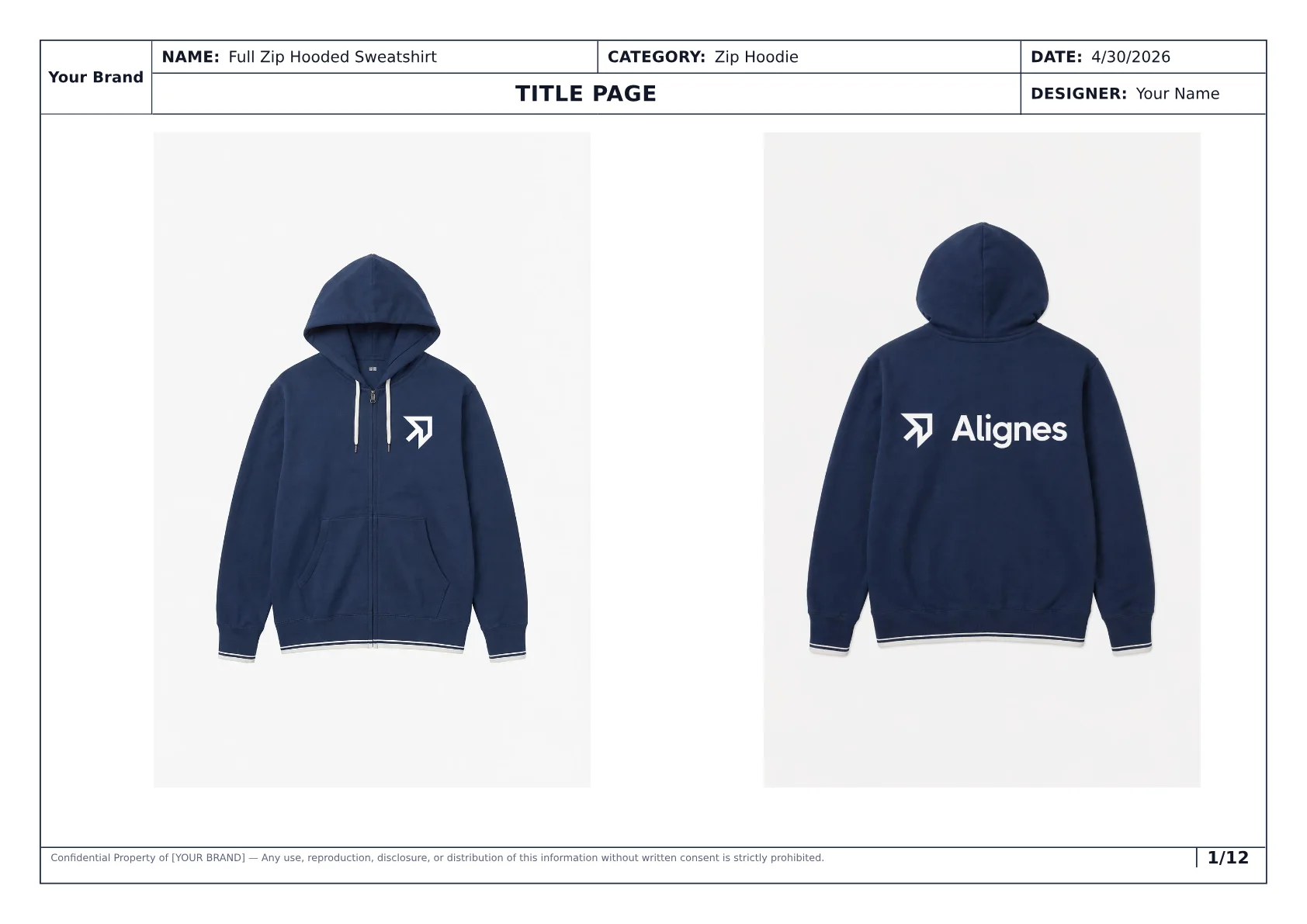
A template becomes useful only when it is filled with garment-specific context. The generated hoodie sample shows the kind of production detail a blank file cannot provide by itself.
What a tech pack template should include
A useful template should give you a place for every section the factory expects to inspect.
| Template section | What you need to fill in |
|---|---|
| Style overview | Style name, category, sample size, size range, and date |
| Front and back visuals | Overview sketches, reference images, or generated garment views |
| Callouts | Detail notes attached to exact garment areas |
| Measurements | Base-size specs, points of measure, units, grading, and fit notes |
| BOM | Fabrics, trims, hardware, labels, artwork, thread, and pending sourcing notes |
| Construction | Seams, stitch types, closures, hems, cuffs, reinforcement, and finish notes |
| Colorways | Color variants tied to the same style structure |
| Artwork and labels | Placement, size, method, file context, and review notes |
| Export file | Current PDF, date, and what the factory should use |
Where blank templates fail
A blank template can make a weak tech pack look organized. It cannot tell whether the details are complete.
Common template gaps:
- measurements are left empty,
- POMs are not named,
- BOM components are too generic,
- construction notes repeat the visual instead of explaining the build,
- artwork placement is vague,
- colorways are not tied to the same garment structure,
- the factory cannot tell what is final and what is pending.
The layout looks done, but the handoff still forces the factory to guess.
Use a template as a checklist, not as the main workflow
Use the template as a quality checklist, not as the main creation workflow.
Start with the garment inputs:
- front and back images,
- sketches or reference photos,
- fit direction,
- material preferences,
- trims and hardware notes,
- artwork and label direction,
- size range,
- factory questions.
Then turn those inputs into the sections above. The hard part is not naming the sections. The hard part is making each section specific enough for sampling, quoting, and factory review. That is why a generated tech pack is a stronger workflow than a blank template: the system creates the filled package first.
Checklist
Before sending a template-based tech pack
Use this check to decide whether the template is filled enough for manufacturer review.
The garment is identifiable
The style name, category, sample size, size range, and dated export are visible.
Visuals and notes match
Front, back, and detail callouts describe the same garment.
Measurements are inspectable
POMs, values, units, and graded measurements are clear.
BOM is populated
Fabrics, trims, labels, hardware, artwork, and assumptions are listed.
Pending decisions are visible
Pending materials, artwork files, and review items are not disguised as final decisions.
Template vs AI-generated tech pack
A template asks you to fill the document. An AI-generated tech pack creates the filled version from your garment references and notes.
The final pass still matters. But the output starts closer to a real tech pack because it is already structured around visuals, specs, measurements, BOM, construction details, callouts, colorways, artwork, and export pages.
Better workflow
From blank template to filled generated package
What changes across the process
- 01
Step 01
Add garment inputs
Upload images, sketches, references, notes, color direction, materials, and construction preferences.
- 02
Step 02
Generate the pack
Produce a structured pack with specs, measurements, BOM, construction, callouts, colorways, artwork, and export pages.
- 03
Step 03
Confirm before handoff
Confirm assumptions, refine details, and send the current export to the manufacturer.
The goal is to avoid starting from an empty table when the system can generate the filled technical package.
Process showing garment inputs becoming a generated tech pack
When a template is still useful
A template is still useful, but only in narrow cases:
- you are learning what a tech pack contains,
- you need a checklist for review,
- your team already has the technical details prepared,
- you want to audit whether a generated draft has every section,
- you need a consistent export structure.
It is weak when you use it as a substitute for garment-specific technical detail. If you are trying to make a production document, generate the filled package instead of decorating an empty one.
In practice
Generate the filled version with Styneo
Upload garment references and let Styneo create the specs, measurements, BOM, construction details, callouts, colorways, artwork notes, and export-ready structure.
Generate a tech packFAQ
Common questions, answered clearly.
Not by itself. A manufacturer needs the sections filled with garment-specific visuals, measurements, materials, construction notes, artwork, and clear export context.
Next step
Generate the filled tech pack instead of filling a template
Styneo generates structured tech packs with specs, measurements, BOM, construction details, callouts, colorways, artwork, and export-ready pages from garment images, sketches, notes, and references.